
You rank #1 when a customer searches from your street. Two kilometers away, you’re invisible. That’s a proximity wall, and it’s costing you customers you don’t even know about.
Most local businesses check their Google Maps rankings from their office or home. They see themselves at the top and assume everything is fine. Meanwhile, customers across the rest of your service area are hiring your competitors because you don’t exist in their search results.
Why Most Rank Tracking Misses This Problem
Traditional rank tracking checks one location — usually your business address. It tells you that you rank #3 for “roofer near me” and you move on with your day.
But Google Maps doesn’t work that way. Your rank changes based on where the searcher is standing. Someone on your block sees you at #1. Someone three kilometers north might see you at #18. Someone on the other side of town won’t see you at all.
This is why proximity walls are so dangerous. You think you’re ranking well because you’re checking from the wrong place. Your customers are searching from their location, not yours, and they’re finding other businesses instead.
How Proximity Walls Form (And Why They’re More Common Than You Think)
Google’s local search algorithm weighs proximity heavily. If two businesses are otherwise equal, the one closer to the searcher usually wins. That’s not the problem. The problem is when your business is only competitive near your address and loses everywhere else.
Here’s what creates a proximity wall:
Your Google Business Profile lacks signals that extend your reach. You have decent reviews, but your competitors have more. Your description mentions your neighborhood, but not the surrounding areas. Your categories are accurate but incomplete. Your website shows one service area, your GBP shows another.
Combined, these issues mean Google only shows your business to searchers near your pin. Everyone else gets competitors with stronger territorial signals.
The Real Cost of a Proximity Wall
Let’s use real numbers. A roofing business in Melbourne’s inner north suburbs was ranking #1 at their business location for “roofer near me” (scanned April 2026). Owner checks Google Maps on his phone, sees himself at the top, thinks business is good.
We ran a 5×5 geo-grid scan across their service area. Here’s what we found:
At their exact location: Rank #1. One kilometer north: Rank #2. Two kilometers west: Rank #9. Three kilometers south: Rank #15. Beyond four kilometers in any direction: Not ranking in the top 20.

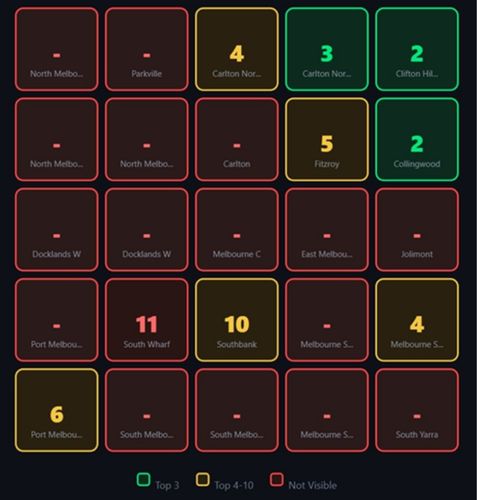
Their Visibility Score was 28 out of 100. They were visible at only 15 of the 25 grid points we checked. Ten points showed them outside the top 20 completely. This is a textbook proximity wall.
The owner thought he was ranking well because he was only checking from his office. He was losing jobs from customers two suburbs over who never saw his business in their search results.
If you service a 10-kilometer radius and you’re only visible within 2 kilometers, you’re invisible to 96% of your potential search area. That’s a revenue problem disguised as a ranking problem.
How to Spot a Proximity Wall Before It Kills Your Leads
You need to check your rankings from multiple locations across your entire service area. Not just your address. Not just your home. Everywhere your customers actually search from.
The fastest way to spot a proximity wall is to run a geo-grid scan. A geo-grid is a network of evenly-spaced points across your service area where we check your exact rank at each location. GeoRankLand checks 25 points in a 5×5 grid, giving you a complete picture of where you’re visible and where you’re not.
If your ranks look like this — 1, 2, 5, 9, 15, null, null, null — you have a proximity wall. Your rankings decay with distance from your location instead of staying consistent across your service area.
Another signal is competitor dominance on the outer grid points. When we scanned that Melbourne roofer, one competitor appeared at 14 of the 25 grid points. That competitor wasn’t necessarily better — they just had signals that extended their reach across the broader area.
Manual Proximity Wall Check (No Tool Required):
- Open Google Maps in incognito window
- Search your main keyword from your business location
- Note your rank
- Change location to 3km away → search again
- Change location to 5km away → search again
- Change location to 7km away → search again
If you dropped 10+ positions or disappeared: You have a proximity wall.
What Breaks Through a Proximity Wall (The Fixes That Actually Work)
Fixing a proximity wall means giving Google stronger signals across your entire service area, not just near your pin. Here’s what actually moves the needle.
Service Area Settings in Your GBP
If your GBP only lists your city, Google assumes you only serve that immediate area. Add every city, suburb, and neighborhood you actually service. Be specific. “Melbourne” is too vague. “Melbourne CBD, South Melbourne, Port Melbourne, Richmond, Collingwood” tells Google where to show you.
Some businesses hide their address and set a service radius instead. This can help if you’re a mobile service — plumbers, locksmiths, roofers. If you have a physical location customers visit, keep your address visible but still define your full service area.
Website Content That Covers Your Territory
Your website needs pages that mention the areas you serve. Not just a service area list buried in your footer. Actual pages with useful content about serving those locations.
A roofing company breaking through a proximity wall might create pages like “Roof Repairs in Richmond” or “Emergency Roofing in South Melbourne”. Each page explains the service, mentions local landmarks or council requirements, and includes real examples from jobs in that area.
Google reads this content and understands you’re relevant to searches in those areas, not just at your business address. This extends your ranking radius.
Citations and Backlinks From Local Sources
Directory listings, local blogs, suburb news sites, council websites — if these mention your business in connection with a specific area, it signals to Google that you operate there.
A single citation from a South Melbourne directory does more for your rankings in South Melbourne than ten generic national directories. Local signals compound your relevance in that specific location.
The same applies to backlinks. A link from a local trade association or a blog post about “Top Roofers in the Eastern Suburbs” extends your reach into those areas because it ties your business to that geography.
Review Language That Mentions Locations
Reviews that say “Great service” help your overall rating. Reviews that say “Came out to Collingwood on short notice and fixed our roof” help your ranking in Collingwood.
You can’t force this, but you can encourage it. After completing a job, send a review request that mentions the suburb: “Thanks for choosing us for your Collingwood roofing project. If you’re happy with the work, we’d appreciate a review.”
Customers naturally mention their location when they write detailed reviews. Those location mentions become ranking signals across your service area.
Review Volume and Recency
Businesses with proximity walls often have decent reviews but not enough of them. A competitor with 89 five-star reviews beats you and your 12 reviews, even if your rating is the same.
Google uses review count as a trust signal. More reviews mean more customers have vouched for you, which means Google feels confident showing you to searchers further from your location.
Recency matters too. Twenty reviews from three years ago is weaker than fifteen reviews from the last six months. Recent review activity signals that you’re actively serving customers across your area, not just coasting on old reputation.
The Geo-Grid Scan: Your Proximity Wall Diagnostic
Here’s how you actually test whether you have a proximity wall and track whether your fixes are working.
Run a geo-grid rank check for your main keyword across your service area. A 5×5 grid gives you 25 data points. Your rank at each point tells you where you’re visible and where you’re not.
Look at the pattern. If your ranks cluster near your location (ranks 1-5) and decay with distance (ranks 10-20 or null), you have a wall. If your ranks stay consistent across the grid (ranks 2-8 across all points), you don’t.
The Visibility Score tells you what percentage of your service area actually sees your business.
Visibility Score Benchmarks:
- 80-100: Excellent territorial coverage
- 60-79: Good coverage with room to improve
- 40-59: Moderate proximity wall — fix this
- Under 40: Severe proximity wall — urgent priority
Check which competitors appear most often across the grid. If one competitor dominates the outer points while you dominate the inner points, they’ve solved the proximity wall problem and you haven’t.
Run the scan again after implementing fixes. If your outer grid ranks improve and your Visibility Score increases, your changes are working. If nothing moves after 30 days, you’re fixing the wrong things.
You can run a free scan at GeoRankLand to see your current grid and identify exactly where your rankings drop off.
What a Fix Report Shows You
After running a scan, you get an AI-powered Fix Report that identifies specific gaps between your business and the competitors beating you on the grid.
The report compares your reviews, rating, category selections, and grid dominance against the businesses that appear most often across your service area. It tells you exactly what they have that you don’t.
If your Fix Report shows that competitors have 60-90 reviews and you have 15, you know that review volume is your first priority. If they’re using secondary categories you’re missing, you add those categories. If they appear in 18 grid points and you appear in 7, you know your reach problem is severe.
The Fix Report doesn’t give generic advice like “get more reviews.” It gives specific targets based on real competitive data from your market. It tells you what good enough actually looks like in your service area.
The Businesses Most Vulnerable to Proximity Walls
Any local business with a physical address serving customers across a wider area is at risk. But some verticals get hit harder than others.
Home services — plumbers, electricians, roofers, HVAC — are proximity wall magnets. You have a shop or office in one suburb but you service ten suburbs. If your signals only extend two suburbs out, you’re invisible to most of your market.
Professional services with local search demand face the same issue. Dentists competing in local SEO often rank well in their immediate neighborhood but disappear across the river or on the other side of the highway. Patients three kilometers away are booking with competitors they can actually find.
Restaurants and retail can hit walls too, especially in spread-out cities. A cafe in one neighborhood might not appear in results for searchers two neighborhoods over, even though they’re a reasonable distance away.
Service businesses without a physical location — mobile mechanics, cleaning services, delivery — face a different problem. Without an address pin, Google uses your service area settings exclusively. If those settings are wrong or incomplete, you might not rank anywhere at all.
The common factor is a mismatch between where you operate and where Google thinks you’re relevant. The wall forms at the edge of Google’s confidence in your service coverage.
Breaking Through vs Breaking In: Understanding the Difference
Breaking through a proximity wall is different from trying to rank in a new area where you don’t operate.
If you serve South Melbourne and you have a proximity wall, you’re trying to rank better in South Melbourne for customers who are already in your service area. You operate there. You have jobs there. You just don’t appear in search results there. That’s what we’re fixing.
If you don’t serve South Melbourne and you want to start ranking there, you need to actually serve that area first. Google doesn’t rank you in places where you have no presence and no track record. You can’t SEO your way into an area you don’t service.
The fix for a proximity wall is extending the reach of your existing operation. The fix for entering a new area is building an actual presence there — getting customers, earning reviews, creating content, and establishing your business in that market.
Don’t confuse the two. A geo-grid scan will show you whether you’re hitting a wall in areas you already serve or whether you’re trying to rank somewhere you have no real presence.
How Long Does It Take to Break Through?
Proximity walls don’t disappear overnight. The changes you make need time to register with Google and influence your rankings across your service area.
Review accumulation takes weeks to months depending on your customer volume. If you complete ten jobs per month and half of customers leave reviews, you’re adding five reviews per month. To go from 15 reviews to 50 reviews takes seven months.
Website content can work faster. If you publish service area pages with strong local signals and internal links, Google might pick them up within two to four weeks. Rankings won’t jump immediately, but you’ll see movement.
Citation and backlink building takes time to implement and more time to impact rankings. A local directory might list you within days, but Google might not credit that citation for weeks. The cumulative effect builds over months, not days.
GBP updates like service area adjustments and category additions can influence rankings within a week or two. These are fast wins if you’ve been missing obvious settings.
Expect to see measurable improvement in your Visibility Score within 30-60 days if you’re implementing multiple fixes simultaneously. Significant change — going from a Visibility Score of 28 to 70 — might take three to six months.
The important thing is to track progress with regular geo-grid scans. If your outer grid ranks improve from null to rank 18, then 18 to 12, then 12 to 8, you’re moving in the right direction. If nothing changes after 60 days, you’re fixing the wrong things or not fixing them aggressively enough.
The Role of Competition in Your Proximity Wall
Your proximity wall isn’t just about your own signals. It’s about your signals relative to the businesses beating you across your service area.
If your competitors have 80 reviews and you have 20, you need to close that gap to compete. If they have content covering ten suburbs and you have content covering two, you’re at a disadvantage in the other eight.
This is why the Fix Report compares you to the actual competitors appearing in your grid. It tells you what they have that you don’t. It gives you a target to hit, not a generic checklist.
In competitive markets, breaking through your proximity wall means matching or exceeding what your top competitors are doing across the key signals. In less competitive markets, moderate improvements can extend your reach significantly because your competition isn’t doing much either.
What Doesn’t Break Through a Proximity Wall
Some tactics that people try don’t actually fix proximity walls. Here’s what wastes your time.
Increasing your service radius setting without building real presence in that radius doesn’t work. Google doesn’t automatically rank you further away just because you told it you serve a wider area. You need signals that back up the claim.
Keyword stuffing your GBP description with suburb names achieves nothing. Google reads your description but it’s a weak signal compared to reviews, citations, and website content. Mentioning twenty suburbs in a paragraph doesn’t extend your reach.
Buying fake reviews from the outer suburbs to create the illusion of service coverage will get your GBP suspended. Google detects review fraud and the penalty is severe. Real reviews from real customers in your service area are the only reviews that help.
Creating spammy location pages with thin content doesn’t build ranking signals. A page that says “We serve Collingwood” and nothing else won’t rank. Google needs useful content that demonstrates real relevance to that area.
Changing your GBP address to a location further from your wall doesn’t fix the underlying problem. It just moves the wall. Unless you actually operate from that address and build signals there, you’re creating a new wall at a different location.
The pattern is the same across all of these: shortcuts that try to fake signals instead of building real ones don’t work. Google’s algorithm is designed to surface businesses with legitimate presence and relevance. You can’t trick your way through a proximity wall.
Your Next Step
If you’re reading this, you probably suspect you have a proximity wall. The next step is to confirm it and measure how severe it is.
Run a geo-grid scan for your main keyword across your service area. Check your Visibility Score. Look at the grid heatmap and see where your rankings drop off. Compare yourself to the competitors dominating the outer points.
You’ll see exactly where you’re visible and where you’re not. You’ll know whether your proximity wall is a small issue (Visibility Score 60-80 with consistent mid-pack ranks) or a major problem (Visibility Score under 40 with null ranks across half the grid).
Once you know what you’re dealing with, start with the fixes that give you the biggest return. If your competitors all have 60+ reviews and you have 18, focus there first. If your website has no service area content, build that. If your GBP service area settings are incomplete, fix them today.
Track your progress every 30 days with another scan. Watch your outer grid ranks improve and your Visibility Score climb. Keep implementing until you’re visible across your entire service area, not just the bubble around your address.
Run a free scan at georankland.com — no account required to see your results.
Update (May 2026): This guide was Updated in May 2026 and reflects current Google Maps ranking behaviour as of that date. Proximity walls are a stable feature of the algorithm, but local pack updates may shift how they manifest over time.