
Why Your Average Google Maps Rank Is Lying to You
You check your Google Maps ranking, see a solid “Position 4,” and feel good about it. Meanwhile, three suburbs over, your business doesn’t appear in the top 20. Those are the customers you’re losing — and your average rank will never tell you.
One Number Can’t Capture a Geographic Problem
When most local SEO tools report your Google Maps ranking, they pick a single location — usually your business address or the centre of your city — and report what rank you appear at from that point.
That number is real. It’s just not representative.
Google doesn’t serve the same results to everyone. A potential customer standing 500 metres from your business sees different rankings than someone standing 3 kilometres away. Your “Position 4” might be “Position 18” for half the people searching in your area.
Averaging those positions into one number smooths over the exact information you need to make decisions.
What’s Actually Happening Across Your Service Area
The way Google Maps rankings work geographically follows a pattern most business owners haven’t been told about: the further a searcher is from your location, the harder it becomes for you to rank.
This isn’t a bug. It’s how proximity signals work in Google’s local algorithm.
We call this the proximity wall — the point at which your rankings drop sharply as distance increases. For most businesses, it sits somewhere between 2 and 4 kilometres from their address. Inside that radius, you might dominate. Outside it, you might not exist.
A single average rank won’t show you where that wall sits. It won’t show you which suburbs you’re invisible in. And it definitely won’t tell you how much business you’re losing because of it.
How a Geo-Grid Changes What You See
A geo-grid approach solves this by measuring your ranking from multiple points across your service area simultaneously — not just one.
GeoRankLand places a 5×5 grid of 25 points around your business and checks your Google Maps ranking from each one. Instead of “you’re ranked 4th,” you see a heatmap: green where you’re visible, red where you’re not.
That’s a fundamentally different picture.
From that data, GeoRankLand calculates a Visibility Score — a 0 to 100 score that weights your top-3 appearances more heavily than your top-10 appearances. It gives you a single number that actually reflects how visible you are across your whole area, not just from one coordinate.
The difference between a Visibility Score and an average rank is the difference between knowing you have a problem and knowing where the problem is.
What Real Scan Data Shows
Take Brunetti, a well-known café in Melbourne. By conventional thinking, a business with that name recognition and Google profile quality should be ranking well.
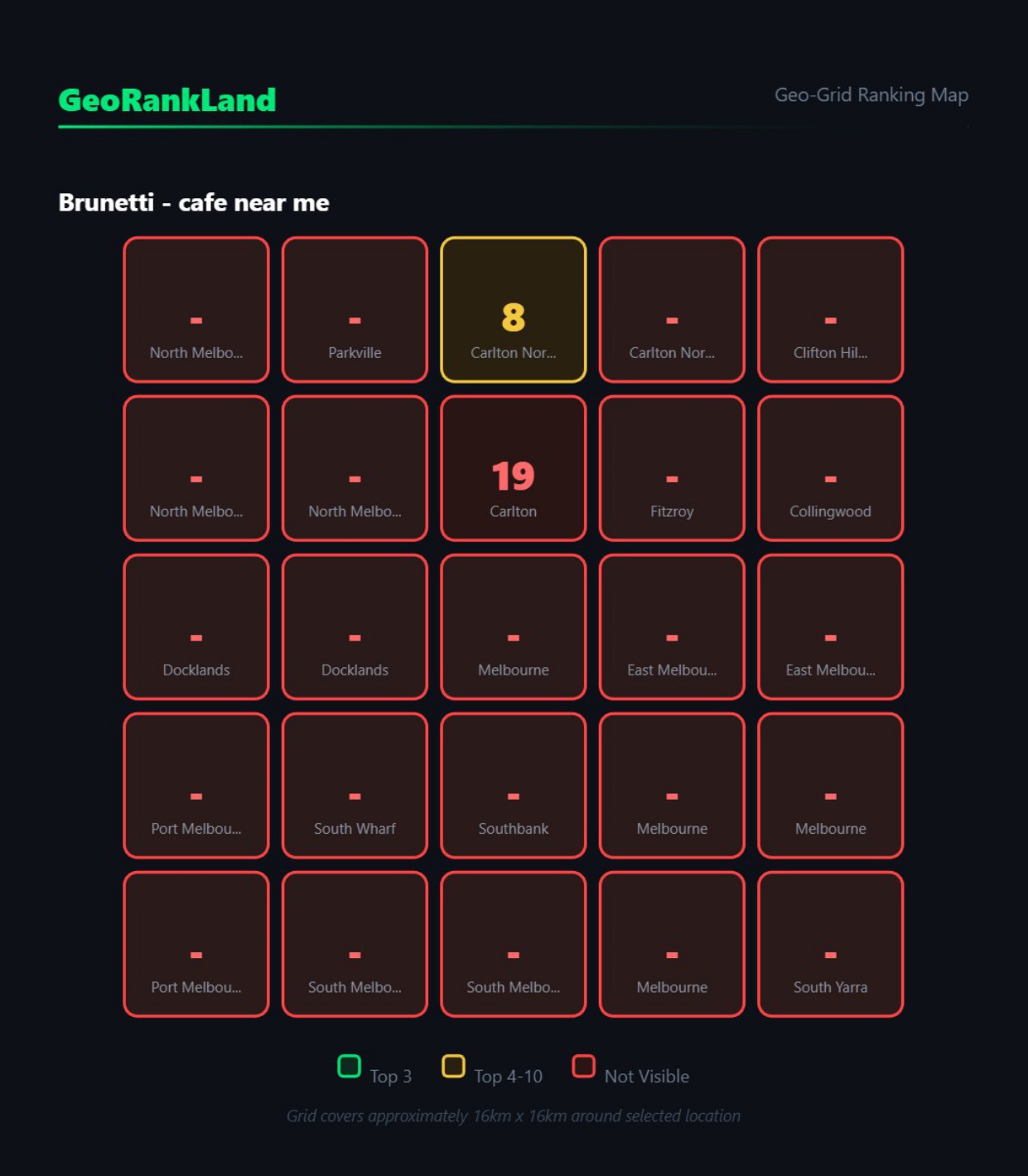
When we ran a geo-grid scan, the Visibility Score came back at 2/100. Twenty-three of 25 grid points showed the business as invisible — not in the top 20 for “cafe near me.”
An average rank for this business from its front door would look fine. The geo-grid told a completely different story.
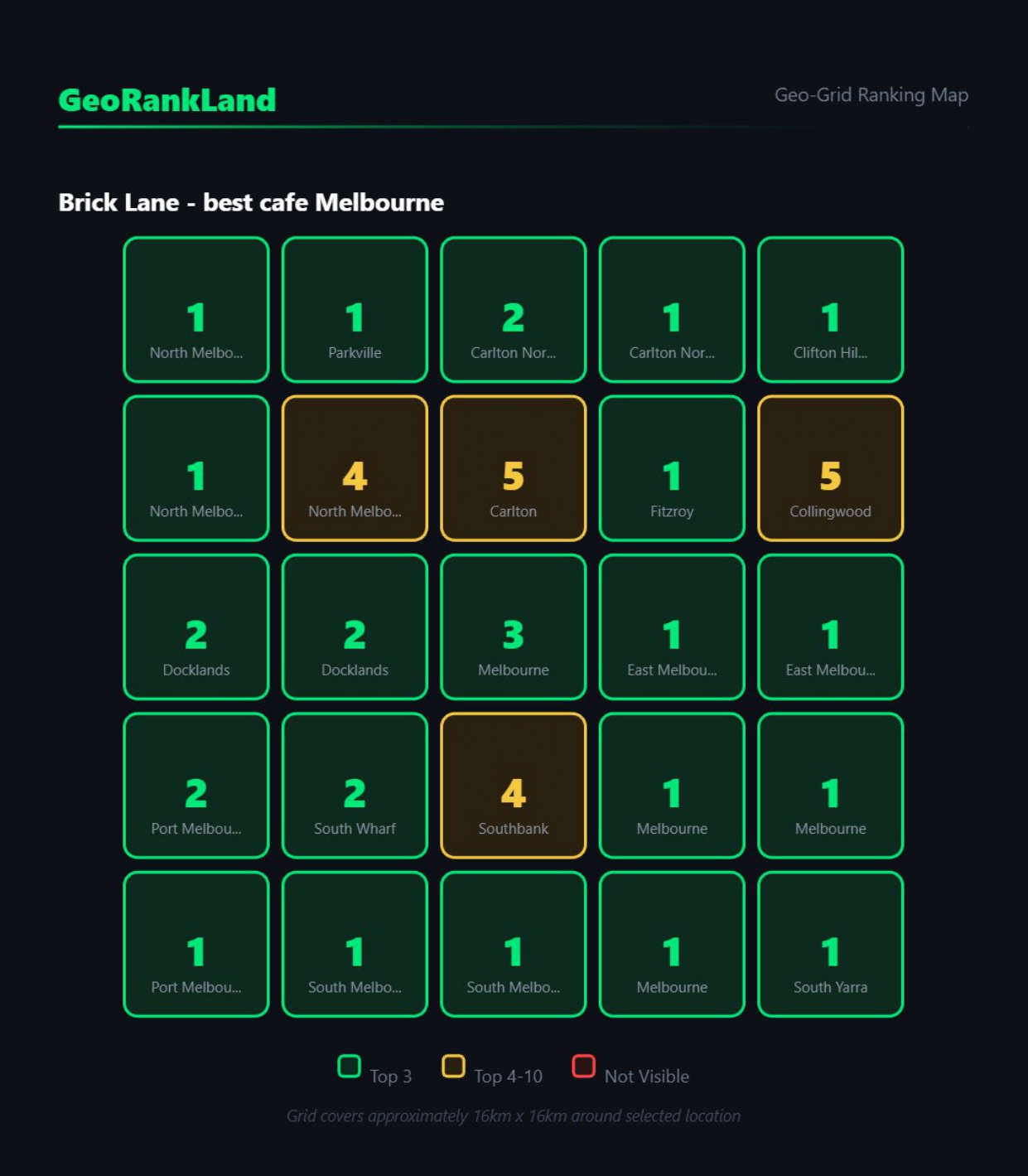
Contrast that with Brick Lane, another Melbourne café. Their scan showed a Visibility Score of 92/100 — 21 of 25 grid points in the top 3. That’s what local dominance actually looks like when you measure it properly.
Both businesses operate in Melbourne. One is effectively invisible to most of its potential foot traffic. The other captures almost every searcher in its area. Average rank alone wouldn’t separate them clearly.
The Specific Mistakes This Reveals
Once you start looking at rankings across a grid rather than from a single point, three problems show up repeatedly:
The invisible suburb problem. You rank well in your immediate area but disappear entirely in a suburb 2 kilometres away that should be within your service zone. You’d never know without a grid scan.
The false plateau. Your average rank looks stable month-on-month, but you’ve actually lost ground in your most valuable suburbs while improving in lower-traffic areas. The average masks the deterioration.
The proximity wall you haven’t diagnosed. You know your rankings drop with distance, but you don’t know exactly where the drop happens or how steep it is. Without that information, you can’t decide whether to address it with content, citations, or profile changes.
Henry Carus & Associates, a Melbourne personal injury law firm, scored 86/100 on Visibility Score — strong overall. But the geo-grid showed clear weak spots in Prahran and East Melbourne. Without that granularity, those gaps would be invisible in any aggregate report.
What to Do With This Information
If you’re managing local SEO for clients, the geo-grid scan is the conversation-starter that average rank reports can’t be. Showing a client a heatmap of where they’re invisible is more compelling than showing them a number.
It also tells you where to focus. If your client has a proximity wall at 1.5 kilometres, that’s a different problem than one at 4 kilometres — and it points to different fixes.
If you’re a business owner managing your own SEO, the geo-grid tells you whether your optimisation efforts are actually expanding your geographic reach or just reinforcing positions you already hold.
In both cases, the starting point is understanding what’s actually happening across your area — not what one coordinate suggests.
The Practical Step Right Now
Run a geo-grid scan on your own business or your most important client. Not to diagnose everything at once, but to see the heatmap with your own eyes.
Look for:
- Where you’re in the top 3 (green zones)
- Where you fall off the map entirely (red zones)
- Where the drop happens — that’s your proximity wall
GeoRankLand’s Fix Report analyses your scan results and gives you a prioritised action plan based on your actual geographic weak spots. It’s not generic SEO advice — it’s built from your specific heatmap data.
One scan takes about 30 seconds. The picture it gives you is one you won’t get from any rank tracker that reports a single number.
Run a free scan at georankland.com — no account required to see your results.